A real nest
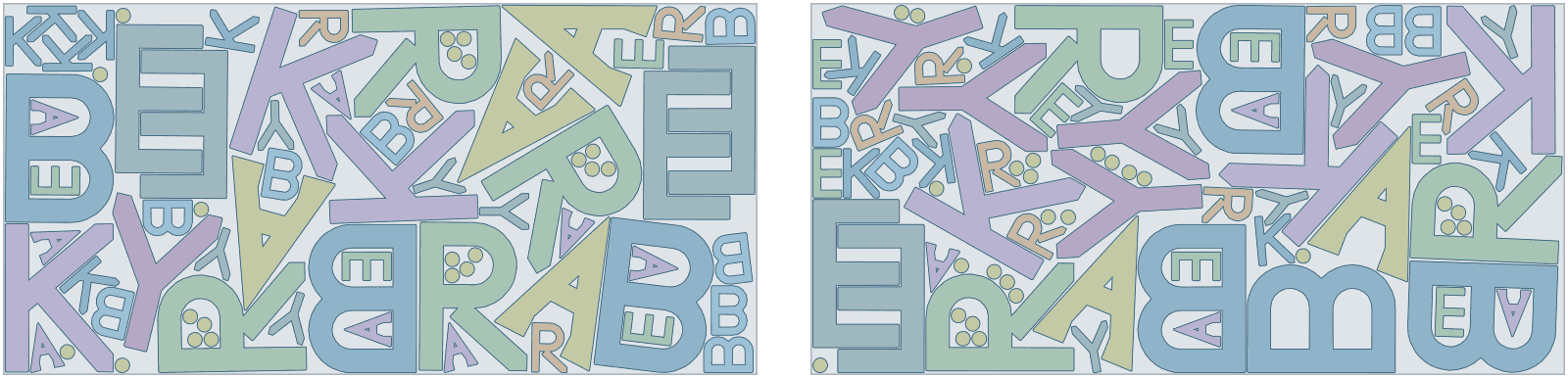
Letters for 6 BAKERY signs from 2 sheets, 68% of the panel used
Fascia letters for a BAKERY sign, 600 mm high, the same word at 200 mm for the door, and standoff spacers, on 3050 × 1500 mm aluminium composite with a 6 mm gap for the router bit. Painted ACM has no direction, so letters turn freely to interlock, but never mirror; door letters and spacers fill the space around and inside the large ones. The order asked for more signs than 2 sheets hold, so with prefer complete sets Lescut placed 6 whole signs and filled the leftover with 62 parts of the next ones.
| Part | Per set | Rotation | Tilt | Mirror |
|---|---|---|---|---|
| letter-b · 2 cut-outs | 1 | free | – | no |
| letter-r · 1 cut-out | 1 | free | – | no |
| letter-k | 1 | free | – | no |
| letter-e | 1 | free | – | no |
| letter-a · 1 cut-out | 1 | free | – | no |
| letter-y | 1 | free | – | no |
| door-b · 2 cut-outs | 1 | free | – | no |
| door-r · 1 cut-out | 1 | free | – | no |
| door-k | 1 | free | – | no |
| door-e | 1 | free | – | no |
| door-a · 1 cut-out | 1 | free | – | no |
| door-y | 1 | free | – | no |
| spacer | 4 | free | – | no |
- complete sets
- 6
- material used
- 67.7%
- sheets used
- 2 of 2
- gap between parts
- 6 mm
- search time
- 2 min
Want to see how Lescut nests your own parts? Start a free trial or send us your parts.
The problem
Letters waste sheet in and around them
Counters and open shapes
The inside of an O, A or B is offcut, and so is the space between the arms of a K or Y. Filling it is where sign nesting saves sheet.
Many jobs, one-offs
Sign shops cut many small jobs. A nest that takes longer to set up than the sheet costs does not get used.
Faces and finishes
Brushed, mirrored and printed sheets have a face and sometimes a direction. Reverse-cut acrylic is mirrored on purpose; everything else must not be.
Applications
Where sign nesting software is used
Fascia and dimensional letters
Letters with counters filled by smaller letters and spacers.
Wayfinding signage
Panels, arrows and plaques in sets per site.
Point of sale and displays
Shaped acrylic and foam board parts nested per sheet.
Exhibition stands
Large graphics panels and cut-out shapes in one job.
Acrylic awards and plaques
Small shaped parts with engraving kept on its layer.
Foam and PVC letters
Thick sign foam letters nested with free rotation.
Settings to start from
A starting point for sign making
Rules per part come from text in your file (NAME, QTY, GRADE, ROT, TILT, FLIP) or the parts table; the rest is saved once in a nesting profile that starts every job.
| For | Setting | Why |
|---|---|---|
| Sheet sizes and goal | each size with its price; lowest material cost | a job can mix sizes and aim for the lowest cost instead of the fewest sheets |
| Letters on painted or plain stock | ROT:ANY | free rotation lets letters interlock; there is no grain to keep |
| Brushed or directional finishes | ROT:180 | the finish runs the same way on every part |
| Mirrored parts | FLIP:N, or FLIP:Y for reverse-cut | never a mirrored letter unless you mean it |
| Gap | your bit diameter plus 1–2 mm | routers and lasers cut between parts |
| Sets | 1 set = 1 sign | short stock places whole signs first |
Preparing your files
From your CAD to Lescut
Lescut reads DXF and SVG; every closed path on a cut layer is a part and every closed path inside it a cut-out.
- Convert text to outlines before export: Lescut nests closed paths, not fonts.
- Put engraving on ENGRAVE, V-grooves and folds of ACM on V-GROOVE or SCORE, and drill holes on DRILL.
- SVG layer groups keep their names, so layers stay mapped to your router's tools.
Good to know
What Lescut does not do
- Lescut moves parts to save material, so it nests unprinted stock. For print-and-cut, nest before you print.
- It does not write toolpaths, inlays or V-carve paths: your CAM does.
- Offcuts are not stored as stock yet.
Savings
What better nesting is worth in sign making
The same parts need the same area of material however they are nested, so a better yield means buying less of it. Aluminium composite and acrylic are among the dearer sheet materials, and letter shapes leave a lot of offcut. The starting figures are an example for a sign shop; enter your own.
70% today → 75.0% with nesting. This is your assumption; the trial measures it on your own files.
Engine time: how the plan is chosen
A day's order of sheets nests well in a job of 1 to 5 minutes; longer jobs can save a further sheet. Your monthly volume divided by this gives the jobs a month, and the calculator picks the cheapest plan whose engine minutes and job length cover them.
The yield gain is your assumption; the trial measures it on your own files. More on how the sheet savings calculator works.
Pricing
Sign nesting software plans, free for 7 days
Every plan starts with a 7-day free trial with engine minutes to nest your own parts against the sheets you would have used. Add a card when you sign up; you are charged only if you keep the plan.
Sheet Starter
€29 per month
120 engine minutes, 8 vCPU per job, jobs up to 2 min
- Sheet nesting: fewest sheets or lowest material cost
- Several sheet sizes in one job
- Rotation, grain and flip rules per part
- Part-in-part nesting
- DXF / SVG in, DXF / SVG out, layers kept
- Complete sets for kits
- 1 user
€0 for 7 days. Card required. Cancel any time.
Extra engine minutes are €0.50 each, with up to 30% off. All sheet nesting plans.
Sign nesting software: questions
Does Lescut put small letters inside large ones?
Yes. A closed outline inside a part is a cut-out, and smaller parts, such as dots, spacers or small letters, are nested inside it when they fit with the gap.
Can I nest artwork from Illustrator or CorelDRAW?
Yes, as SVG or DXF. Convert text to outlines and expand strokes that should be cut into closed paths first.
Which materials can I nest?
Anything cut from sheets: cast and extruded acrylic, aluminium composite panel, PVC foam board, polycarbonate, HDU sign foam, MDF and plywood.
Can I nest several customers' signs together?
Yes. Put them in one part library and nest them in one job; the job report lists which parts are on which sheet.