A real nest
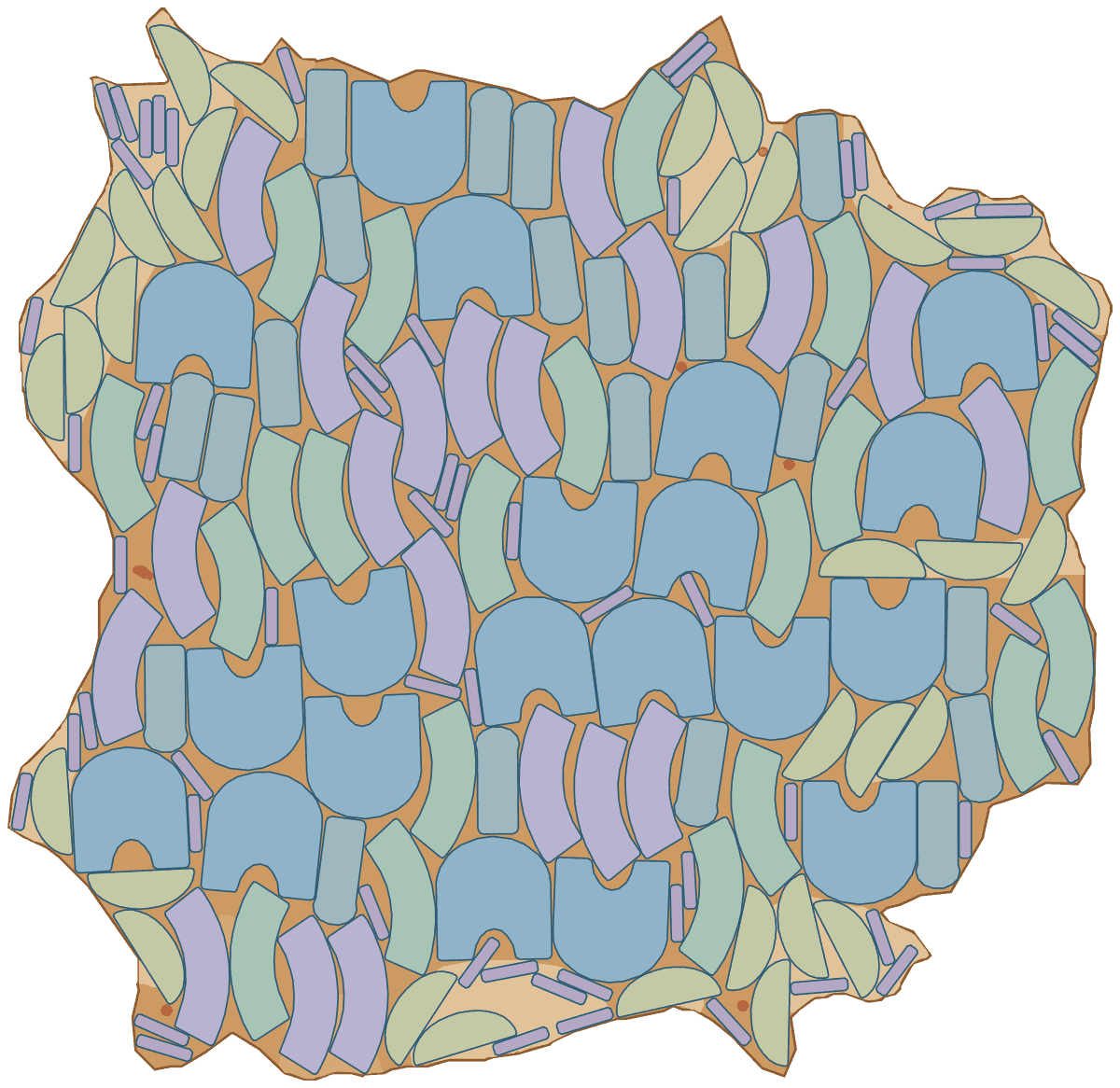
10 pairs of derbies from one scanned hide, 80% of the leather used
A men's derby, 12 pieces a pair, nested on hide H-2026-0011, scanned from a real hide with its grade zones and defects. Vamps sit on prime leather only; quarters and tongues take grade B, the back strap C and the counter lining D. Vamps, quarters and tongues stay along the backbone, turned at most 10° off it; the hidden linings turn freely and fill the gaps. The order asked for more pairs than this hide holds, so with prefer complete sets Lescut placed 10 whole pairs and filled the leftover with 53 parts of the next ones.
| Part | Per set | Grade | Rotation | Tilt | Mirror |
|---|---|---|---|---|---|
| vamp | 2 | prime | 180° steps | ±10° | no |
| quarter-l | 2 | B | 180° steps | ±10° | no |
| quarter-r | 2 | B | 180° steps | ±10° | no |
| tongue | 2 | B | 180° steps | ±10° | no |
| counter-lining | 2 | D | free | – | no |
| back-strap | 2 | C | free | – | no |
- complete sets
- 10
- material used
- 80.4%
- hides used
- 1 of 1
- gap between parts
- 2 mm
- search time
- 2 min
Want to see how Lescut nests your own parts? Start a free trial or send us your parts.
The problem
Small pieces, size runs and leather that is never the same twice
Each piece has its own leather
The vamp shows and stretches over the toe, so it needs the best leather on the hide. Quarters can take a grade less, and counter linings or heel stiffeners can use leather nobody will see. A nest that puts every piece on the best leather runs out of best leather.
Stretch follows the backbone
Leather stretches more across the hide than along it, so vamps and quarters are cut in line with the backbone. Allow a few degrees either way and the pieces pack much tighter without changing how the upper lasts.
Hundreds of small pieces per batch
A size run of a few dozen pairs is hundreds of pieces. Placing them by hand on the table, or with clicking dies, leaves the gaps between pieces and the choice around each defect to the operator, on every hide.
Applications
Where footwear nesting software is used
Men's and women's shoes
Vamps, quarters and tongues on the leather each piece needs, size runs nested together.
Sneakers and sports shoes
Leather overlays and small reinforcement pieces that fill the gaps between uppers.
Boots
Long shafts that need straight runs of leather along the backbone.
Safety footwear
Thick, graded leather for uppers that must meet a standard, with linings from lower grades.
Sandals and slippers
Straps and footbeds from the leather between larger pieces.
Linings and insoles
Hidden pieces that use the lower grades and the leftover of every hide.
Settings to start from
A starting point for footwear
Rules per part come from text in your file (NAME, QTY, GRADE, ROT, TILT, FLIP) or the parts table; the rest is saved once in a nesting profile that starts every job.
| For | Setting | Why |
|---|---|---|
| Vamps | GRADE:A, ROT:180, TILT:10 | prime leather where it shows; along the backbone, either way round, up to 10° off it |
| Quarters and tongue | GRADE:B, ROT:180, TILT:10 | a grade less; the same direction rule as the vamp |
| Linings and counters | GRADE:C to D, ROT:ANY | hidden pieces turn freely and fill the gaps between uppers |
| Left and right pieces | two parts, FLIP:N | a mirrored piece is the other foot's piece, so each is drawn and counted on its own |
| Gap | 1.5–2 mm | enough for the knife or laser kerf; more wastes leather on hundreds of edges |
| Sets | 1 set = 1 pair | the number of sets is the number of pairs; prefer complete sets keeps pairs whole |
| Time | 2–5 minutes a batch | a first nest comes within seconds; longer runs find nests on fewer hides |
Preparing your files
From your CAD to Lescut
Footwear pattern CAD such as Shoemaster, Romans CAD or Rhino-based tools exports the flattened pieces as DXF. Lescut reads closed outlines as pieces and keeps everything else in the file.
- Put stitch lines on a STITCH layer, perforations and eyelets on DRILL or PUNCH, and notches on NOTCH: they travel with their piece and are never cut as outlines.
- Draw a piece's grain line on a GRAIN layer, or give ROT:180 with a TILT, to keep it along the backbone.
- Use a QZ_A layer inside a piece for the area that must be prime while the rest of the piece may take a lower grade, for example the toe of a vamp.
- Export every size of the run in one file if you nest them together, each piece named per size (vamp-41, vamp-42…), with its quantity per pair.
Good to know
What Lescut does not do
- Lescut nests on scanned hides only: it needs your scanner's DXF with the hide outline, and it does not digitise hides from photos.
- It writes cutting files for digital cutters. Clicking presses with steel dies get no file to follow; the nest still shows how many hides an order needs.
- It does not grade patterns. Export each size from your pattern CAD.
- Synthetic and textile uppers come on the roll; they are nested with fabric nesting, which is a separate Lescut organization.
Savings
What better nesting is worth in footwear
The same parts need the same area of material however they are nested, so a better yield means buying less of it. Upper leather is most of a shoe's material cost, and footwear yields run lower than furniture because of the small pieces, grades and stretch rules. These starting figures are for a factory cutting calf skins of about 20 ft²; enter your own.
68% today → 71.0% with nesting. This is your assumption; the trial measures it on your own files.
Engine time: how the plan is chosen
A batch of about 10 hides nests well in a 10-minute job; a single hide waiting on the table needs 10 to 30 seconds. Your monthly volume divided by this gives the jobs a month, and the calculator picks the cheapest plan whose engine minutes and job length cover them.
The yield gain is your assumption; the trial measures it on your own files. More on how the leather yield calculator works.
Pricing
Footwear nesting software plans, free for 7 days
Every plan starts with a 7-day free trial with engine minutes to nest your own parts against the hides you would have used. Add a card when you sign up; you are charged only if you keep the plan.
Leather Enterprise
from €890 per month
4,500 engine minutes, up to 16 vCPU per job, jobs up to 60 min
- Everything in Leather Pro
- 5× the engine minutes and jobs up to 60 min for large orders
- 10 jobs at a time, each on its own machine with up to 16 vCPU
- Priority queue
- Unlimited team members
- SSO (planned)
€0 for 7 days. Card required. Cancel any time.
Extra engine minutes are €0.50 each, with up to 30% off. All leather nesting plans.
Footwear nesting software: questions
Can Lescut keep vamps along the backbone?
Yes. A piece with ROT:180 keeps its grain line along the hide, or its drawn direction when it has none, or turns half round, and TILT lets it turn up to 10° off that direction when your leather allows. The hide's direction is the one in your scanner's file, so scan with the backbone along the same axis every time.
How do I nest left and right pieces?
Draw both in the pattern file as separate pieces with their quantities per pair. Flipping is off unless you allow it, because on leather a mirrored piece is the other foot's piece with the grain side down.
Can one job nest a whole size run?
Yes. Put every size's pieces in one part library with their quantity per set, and a set becomes one size run. The job nests them together, up to your plan's piece limit, and fills small gaps with the small sizes.
Do I need a hide scanner?
Yes. Lescut nests on the hide outline, defects and grade zones from your scanner's DXF. Any scanner that exports layers works; a scanner profile maps its layer names once.
Which cutters can use the files?
Any knife cutting table or laser whose software imports DXF or SVG. Each hide comes back as one file with your original layers and curves, stitch and punch marks included.