A real nest
7 totes with wallets from one scanned hide, 87% of the leather used
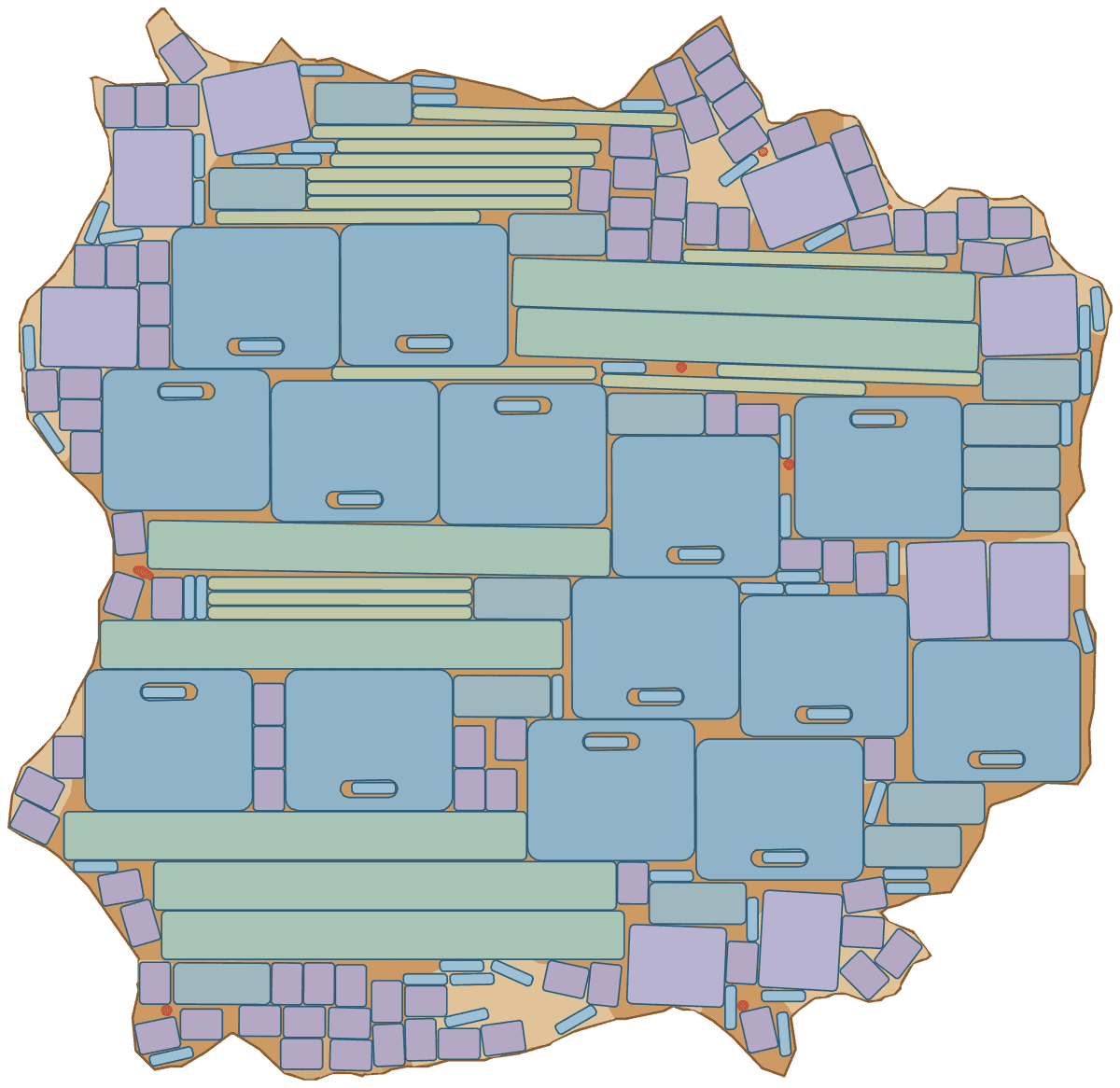
A tote bag and a wallet, 12 pieces a set, on hide H-2026-0011, scanned from a real hide. Bag fronts, handles and the wallet body take prime leather only, the gusset grade B, pockets, card slots and keepers grade C. Each tote panel has a handle slot, and the keepers are small enough to be cut from inside it. The order asked for more sets than this hide holds, so with prefer complete sets Lescut placed 7 whole sets and filled the leftover with 121 parts of the next ones.
| Part | Per set | Grade | Rotation | Tilt | Mirror |
|---|---|---|---|---|---|
| tote-panel · 1 cut-out | 2 | prime | 180° steps | – | no |
| gusset | 1 | B | 180° steps | ±2° | no |
| inner-pocket | 1 | C | free | – | no |
| wallet-body | 1 | prime | 180° steps | – | no |
| handle | 2 | prime | 180° steps | ±2° | no |
| card-slot | 3 | C | free | – | no |
| keeper | 2 | C | free | – | no |
- complete sets
- 7
- material used
- 87.0%
- hides used
- 1 of 1
- gap between parts
- 2 mm
- search time
- 2 min
Want to see how Lescut nests your own parts? Start a free trial or send us your parts.
The problem
Expensive leather, big panels and tiny pieces
The front panel sets the standard
A bag's front is its face: flawless leather, grain in one direction. Its gussets, linings and pockets do not need that, and they are what should go on the rest of the hide.
Straps are long and thin
Handles and gussets can be a metre long and only a few centimetres wide. They need a clean run of leather along the backbone, and a nest that places them last finds none.
Short runs, new models every season
Collections change and runs are short, so the nest for a new model has to be ready in minutes, not after a day in the CAD department.
Applications
Where leather goods nesting software is used
Handbags and totes
Fronts on prime leather, gussets along the backbone, small parts in handle slots.
Wallets and small leather goods
Many small pieces that fill the gaps between larger ones.
Belts and straps
Long blanks along the backbone of the hide.
Watch straps
Tiny pieces from the best leather, nested by the hundred.
Luggage and travel goods
Large panels and trims from heavy leather.
Phone and tech cases
Small runs of new models, nested in seconds.
Exotic skins
Crocodile, python and ostrich, each skin with its own price for the lowest-cost nest.
Settings to start from
A starting point for bags and leather goods
Rules per part come from text in your file (NAME, QTY, GRADE, ROT, TILT, FLIP) or the parts table; the rest is saved once in a nesting profile that starts every job.
| For | Setting | Why |
|---|---|---|
| Fronts, handles, wallet bodies | GRADE:A, ROT:180 | flawless leather, grain one way |
| Gussets | GRADE:B, ROT:180, TILT:2 | long strips along the backbone, a little tolerance |
| Pockets, card slots, keepers | GRADE:C, ROT:ANY | inside the product; they fill gaps and cut-outs |
| Goal | lowest leather cost | when skins of one batch have their own prices, as exotic skins do |
| Gap | 1.5–2 mm | the knife or laser kerf |
Preparing your files
From your CAD to Lescut
Leather goods patterns come from CAD or from Illustrator. Lescut reads DXF and SVG; each closed outline on a cut layer is a piece, a closed outline inside it a cut-out.
- Put stitch lines on STITCH, embossing or logo positions on ENGRAVE or MARK, and hole punches on DRILL: they travel with the piece.
- Draw handle slots and windows as closed outlines inside the piece: they are cut, and small pieces can be nested inside them.
- In SVG from Illustrator, convert text and strokes to closed paths for anything that should be cut.
Good to know
What Lescut does not do
- Skins must be scanned to DXF with their outline; Lescut does not digitise them from photos.
- Each job nests on one or more scanned batches; a hide is not reserved, so two jobs can plan the same hide.
- Synthetic leather on the roll is nested with fabric nesting, a separate Lescut organization.
Savings
What better nesting is worth in bags and leather goods
The same parts need the same area of material however they are nested, so a better yield means buying less of it. Leather goods use the dearest leather per square foot, and small pieces leave the most room to gain. The starting figures are an example for a workshop cutting calf and exotic skins; enter your own.
65% today → 69.0% with nesting. This is your assumption; the trial measures it on your own files.
Engine time: how the plan is chosen
A batch of about 10 hides nests well in a 10-minute job; a single hide waiting on the table needs 10 to 30 seconds. Your monthly volume divided by this gives the jobs a month, and the calculator picks the cheapest plan whose engine minutes and job length cover them.
The yield gain is your assumption; the trial measures it on your own files. More on how the leather yield calculator works.
Pricing
Leather goods nesting software plans, free for 7 days
Every plan starts with a 7-day free trial with engine minutes to nest your own parts against the hides you would have used. Add a card when you sign up; you are charged only if you keep the plan.
Leather Enterprise
from €890 per month
4,500 engine minutes, up to 16 vCPU per job, jobs up to 60 min
- Everything in Leather Pro
- 5× the engine minutes and jobs up to 60 min for large orders
- 10 jobs at a time, each on its own machine with up to 16 vCPU
- Priority queue
- Unlimited team members
- SSO (planned)
€0 for 7 days. Card required. Cancel any time.
Extra engine minutes are €0.50 each, with up to 30% off. All leather nesting plans.
Leather goods nesting software: questions
Can I nest exotic skins?
Yes, once they are scanned to DXF with outline, defects and any grade zones. Give each skin its price and choose the lowest leather cost, and Lescut picks the skins that make the order cheapest.
Can small pieces be cut from inside a handle slot?
Yes. A closed outline inside a piece is a cut-out, and smaller pieces of the order may be nested inside it when they fit with the gap.
How quickly do I get a nest for a new model?
The first nest shows within seconds of starting the job. The search then keeps looking for a nest on fewer hides until the time you set; stop it whenever the nest is good enough.
Can a set mix several products?
Yes. A set is everything in the part library at its quantities, so a bag and its matching wallet, or a whole small collection, can be one set.