A real nest
12 enclosure kits from 2 plates, 76% of the steel used
An enclosure kit of base plate, flange, L-brackets with bend lines, gussets, mounting strips and washers: 18 parts a kit, on 3000 × 1500 mm plates with a 5 mm gap. Small parts are cut from the base plates' cable openings and the flanges' bores. The order asked for more kits than 2 plates hold, so with prefer complete sets Lescut placed 12 whole kits and filled the leftover with 49 parts of the next ones.
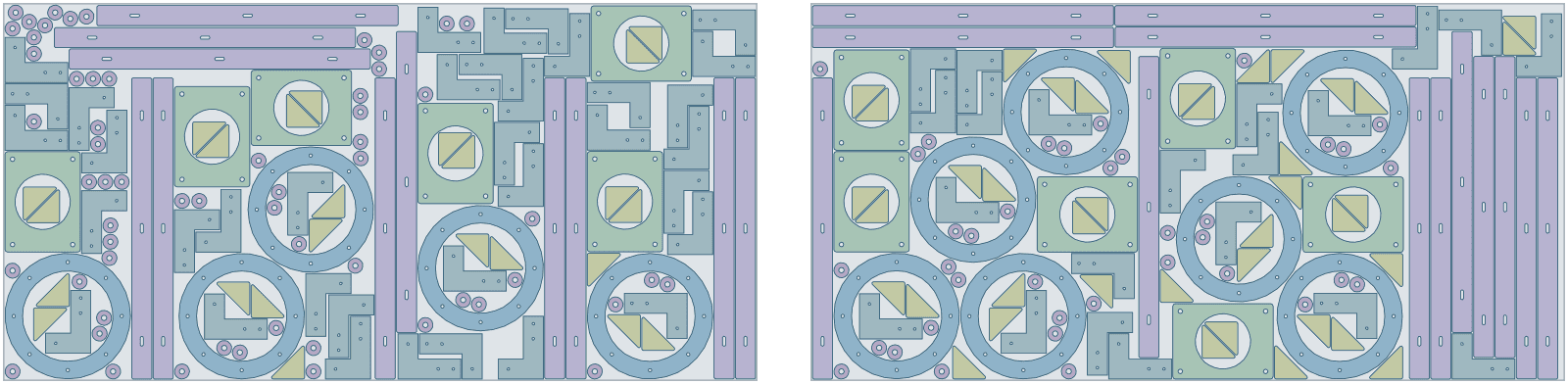
| Part | Per set | Rotation | Tilt | Mirror |
|---|---|---|---|---|
| flange · 9 cut-outs | 1 | free | – | no |
| base-plate · 5 cut-outs | 1 | 90° steps | – | no |
| mounting-strip · 3 cut-outs | 2 | 90° steps | – | no |
| l-bracket · 3 cut-outs | 4 | 90° steps | – | no |
| gusset | 4 | 90° steps | – | no |
| washer · 1 cut-out | 6 | free | – | no |
- complete sets
- 12
- material used
- 75.5%
- sheets used
- 2 of 2
- gap between parts
- 5 mm
- search time
- 2 min
Want to see how Lescut nests your own parts? Start a free trial or send us your parts.
The problem
Plate is the cost, and nesting is tied to the machine
Parts in parts
Flanges, base plates and covers have large openings. Small parts cut from them save plate on every order.
Brushed and directional finishes
Brushed stainless and patterned plate must run the same way on every visible part, which limits rotation.
Nesting on one workstation
Nesting in machine CAM often runs on one licensed PC, next to one machine. Quoting and planning wait for it.
Applications
Where sheet metal nesting software is used
Laser cutting job shops
Mixed orders nested per plate, small parts in cut-outs.
Plasma and oxyfuel cutting
Thick plate parts with a wider gap for the kerf.
Waterjet cutting
Metal, stone and glass parts from DXF.
Steel fabrication
Brackets, gussets and base plates as kits per assembly.
Enclosures and cabinets
Flat patterns with bend lines carried to the file.
Machinery and agricultural parts
Repeat parts in volume, kits kept whole.
Architectural metalwork
Screens and facade panels with brushed finishes kept in line.
Settings to start from
A starting point for sheet metal
Rules per part come from text in your file (NAME, QTY, GRADE, ROT, TILT, FLIP) or the parts table; the rest is saved once in a nesting profile that starts every job.
| For | Setting | Why |
|---|---|---|
| Sheet sizes and goal | each size with its price; lowest material cost | a job can mix sizes and aim for the lowest cost instead of the fewest sheets |
| Plain plate | ROT:90 | 90° steps keep parts square to the plate edges; ROT:ANY for round parts |
| Brushed or patterned plate | ROT:180, FLIP:N | the finish runs the same way, good side up |
| Gap | kerf plus lead-in room | a few mm for laser, more for plasma |
| Bend lines | a layer named with MARK, e.g. BEND_MARK | travel with the part instead of being cut |
| Sets | 1 set = 1 kit or assembly | short stock places whole kits first |
Preparing your files
From your CAD to Lescut
Lescut reads DXF flat patterns from any CAD system and keeps every layer it does not cut.
- Name the bend-line layer with MARK in it (for example BEND_MARK), or set its role in an import profile; a layer called only BEND would be read as outlines.
- Put etching on ETCH and part numbers on TEXT: they travel with the part.
- Ignore dimension and title-block layers with an import profile.
Good to know
What Lescut does not do
- Lescut does not write toolpaths, lead-ins, micro-joints or common-line cuts: your CAM does.
- Remnant plates are not stored as stock yet.
- It nests flat parts only; tube and profile cutting is out of scope.
Savings
What better nesting is worth in sheet metal
The same parts need the same area of material however they are nested, so a better yield means buying less of it. Plate is bought by weight, and parts in parts and tighter nests mean fewer plates per order. The starting figures are an example for a fabrication shop cutting 3 mm plate; enter your own.
72% today → 75.0% with nesting. This is your assumption; the trial measures it on your own files.
Engine time: how the plan is chosen
A day's order of sheets nests well in a job of 1 to 5 minutes; longer jobs can save a further sheet. Your monthly volume divided by this gives the jobs a month, and the calculator picks the cheapest plan whose engine minutes and job length cover them.
The yield gain is your assumption; the trial measures it on your own files. More on how the sheet savings calculator works.
Pricing
Sheet metal nesting software plans, free for 7 days
Every plan starts with a 7-day free trial with engine minutes to nest your own parts against the sheets you would have used. Add a card when you sign up; you are charged only if you keep the plan.
Sheet Starter
€29 per month
120 engine minutes, 8 vCPU per job, jobs up to 2 min
- Sheet nesting: fewest sheets or lowest material cost
- Several sheet sizes in one job
- Rotation, grain and flip rules per part
- Part-in-part nesting
- DXF / SVG in, DXF / SVG out, layers kept
- Complete sets for kits
- 1 user
€0 for 7 days. Card required. Cancel any time.
Extra engine minutes are €0.50 each, with up to 30% off. All sheet nesting plans.
Sheet metal nesting software: questions
Does Lescut do lead-ins, common-line cutting or micro-joints?
No. Lescut nests the parts and returns DXF; lead-ins, micro-joints, common-line cuts and cut order stay with your CAM.
Can I nest on remnant plates?
Rectangular ones, yes: enter each plate size with its count. Irregular remnants not yet.
Which machines can use the files?
Any laser, plasma or waterjet whose CAM imports DXF. Each plate is one DXF with the plate outline on a SHEET layer.
How do I keep bend lines out of the cut?
Put them on a layer whose name contains MARK, such as BEND_MARK, or mark the layer in an import profile. They then travel with the part as marks.