A real nest
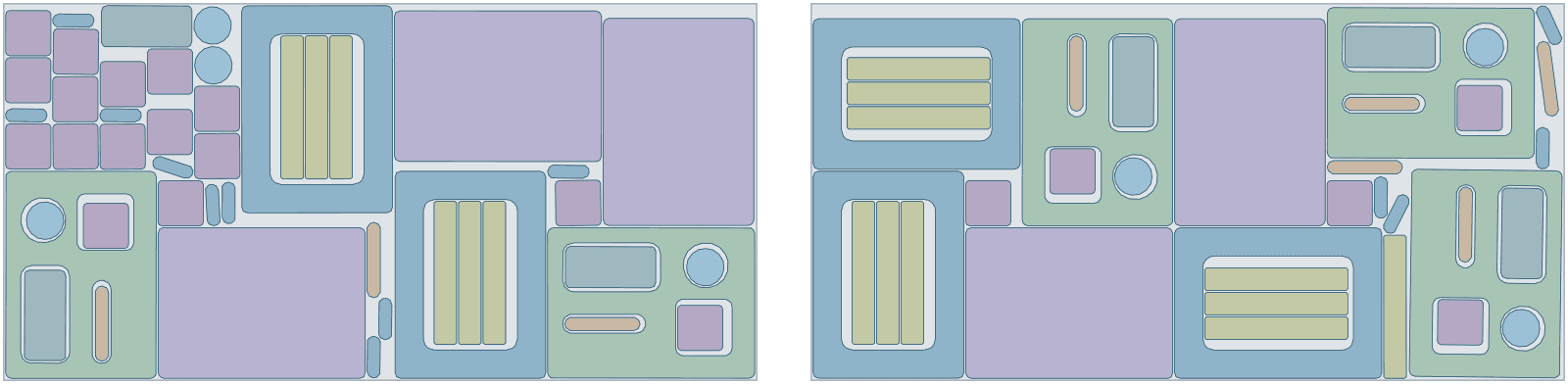
5 tool case insert sets from 2 sheets of PE foam, 85% used
A tool case's insert with four tool cut-outs, a base pad, a lid frame, dividers, a handle block, corner blocks, finger pulls, a pick-out plug and a lid stop: 15 parts a case, on 2000 × 1000 mm sheets with a 5 mm gap for the knife. Foam has no grain, so every part turns freely, and the small parts are cut from the insert's and lid's cut-outs. The order asked for more cases than 2 sheets hold, so with prefer complete sets Lescut placed 5 whole cases and filled the leftover with 11 parts of the next ones.
| Part | Per set | Rotation | Tilt | Mirror |
|---|---|---|---|---|
| lid-frame · 1 cut-out | 1 | free | – | no |
| tool-insert · 4 cut-outs | 1 | free | – | no |
| base-pad | 1 | free | – | no |
| handle-block | 1 | free | – | no |
| divider | 3 | free | – | no |
| corner-block | 4 | free | – | no |
| pick-out-plug | 1 | free | – | no |
| lid-stop | 1 | free | – | no |
| finger-pull | 2 | free | – | no |
- complete sets
- 5
- material used
- 84.9%
- sheets used
- 2 of 2
- gap between parts
- 5 mm
- search time
- 5 min
Want to see how Lescut nests your own parts? Start a free trial or send us your parts.
The problem
The cut-outs are part of the material
Tool cut-outs are foam you paid for
The shapes cut out for the tools are large; thrown away, they are a big share of every insert. Cut into the case's small parts, they are not.
Every case is different
Custom cases are made to order, often one or a few at a time, so a nest has to be ready in minutes for each order.
Thick, soft material
Knife and router cuts in foam need a wider gap than film or fabric, which makes tight layouts matter more.
Applications
Where foam insert nesting software is used
Tool case inserts
Inserts with tool cut-outs, nested so the cut-outs take the case's small parts.
Foam shadow boards
Two-colour foam for tool control in workshops and hangars, nested per sheet colour.
Flight and instrument cases
Custom inserts for one-off cases, ready to cut in minutes.
Protective packaging
End caps, corner blocks and pads in PE or PU foam, nested in volume.
Medical and electronics trays
Inserts that hold devices in transit, nested with their pockets.
Gun and camera cases
Precise inserts with many cut-outs, filled with small parts of the same order.
Settings to start from
A starting point for foam inserts and packaging
Rules per part come from text in your file (NAME, QTY, GRADE, ROT, TILT, FLIP) or the parts table; the rest is saved once in a nesting profile that starts every job.
| For | Setting | Why |
|---|---|---|
| Sheet sizes and goal | each size with its price; lowest material cost | a job can mix sizes and aim for the lowest cost instead of the fewest sheets |
| Foam parts | ROT:ANY | foam has no grain |
| Tool cut-outs | closed outlines inside the part | cut through, and filled with small parts |
| Milled pockets | ENGRAVE, MARK or PEN layer | travel with the insert; not cut through |
| Gap | 3–6 mm | the knife or bit in thick foam |
| Sets | 1 set = 1 case | short stock places whole cases first |
Preparing your files
From your CAD to Lescut
Lescut reads DXF and SVG; each closed outline is a part and each closed outline inside it a through cut-out.
- Draw through cut-outs on the cut layer and milled pockets on a layer such as ENGRAVE or PEN, so they are not cut through.
- Give each case's parts their quantities per case with QTY text or in the parts table.
- Nest each foam type and thickness as its own job.
Good to know
What Lescut does not do
- Lescut nests in 2D on sheets; it does not nest blocks in 3D or plan foam layers.
- It does not write router toolpaths for pockets: your CAM does.
- Foam from the roll is nested with fabric nesting.
Savings
What better nesting is worth in foam inserts and packaging
The same parts need the same area of material however they are nested, so a better yield means buying less of it. Foam sheets are not cheap and inserts throw away their cut-outs. The starting figures are an example for a case maker cutting PE foam sheets; enter your own.
65% today → 71.0% with nesting. This is your assumption; the trial measures it on your own files.
Engine time: how the plan is chosen
A day's order of sheets nests well in a job of 1 to 5 minutes; longer jobs can save a further sheet. Your monthly volume divided by this gives the jobs a month, and the calculator picks the cheapest plan whose engine minutes and job length cover them.
The yield gain is your assumption; the trial measures it on your own files. More on how the sheet savings calculator works.
Pricing
Foam insert nesting software plans, free for 7 days
Every plan starts with a 7-day free trial with engine minutes to nest your own parts against the sheets you would have used. Add a card when you sign up; you are charged only if you keep the plan.
Sheet Starter
€29 per month
120 engine minutes, 8 vCPU per job, jobs up to 2 min
- Sheet nesting: fewest sheets or lowest material cost
- Several sheet sizes in one job
- Rotation, grain and flip rules per part
- Part-in-part nesting
- DXF / SVG in, DXF / SVG out, layers kept
- Complete sets for kits
- 1 user
€0 for 7 days. Card required. Cancel any time.
Extra engine minutes are €0.50 each, with up to 30% off. All sheet nesting plans.
Foam insert nesting software: questions
Can small parts be cut from the tool cut-outs?
Yes. A closed outline inside a part is a cut-out, and smaller parts of the order are nested inside it when they fit with the gap.
Which foams can I nest?
Any in sheets: polyethylene, cross-linked PE, EVA, polyurethane, Kaizen-style layered foam, and corrugated or honeycomb board.
Does Lescut handle pockets milled to depth?
It carries them: put pockets on their own layer and they travel with the insert into the cutting file, where your CAM mills them.