A real nest
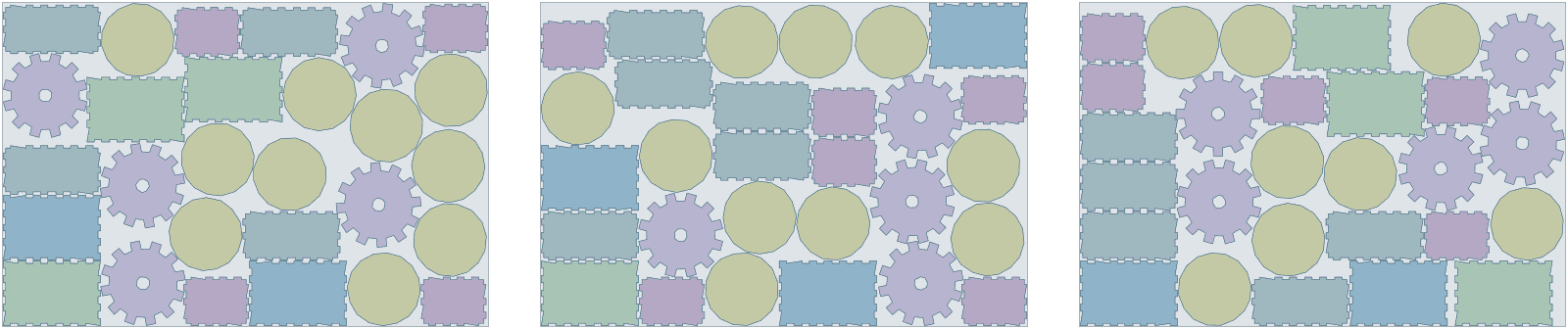
7 box kits from 3 sheets of plywood, 78% used
A finger-jointed box with an engraved lid, four coasters and two gears: 12 parts a kit, on 600 × 400 mm sheets of 3 mm plywood with a 1 mm gap. Box panels keep the plywood grain along their length; coasters and gears turn freely. The order asked for more kits than 3 sheets hold, so with prefer complete sets Lescut placed 7 whole kits and filled the leftover with 1 part of the next ones.
| Part | Per set | Rotation | Tilt | Mirror |
|---|---|---|---|---|
| lid | 1 | 180° steps | – | no |
| bottom | 1 | 180° steps | – | no |
| gear · 1 cut-out | 2 | free | – | no |
| side | 2 | 180° steps | – | no |
| coaster | 4 | free | – | no |
| end | 2 | 180° steps | – | no |
- complete sets
- 7
- material used
- 77.6%
- sheets used
- 3 of 3
- gap between parts
- 1 mm
- search time
- 2 min
Want to see how Lescut nests your own parts? Start a free trial or send us your parts.
The problem
The kerf is thin, so the gaps you leave are the waste
Layout by hand takes the time
Arranging parts by hand in laser software takes longer than the cut, so most files are laid out once and cut as they are, with the same waste each time.
Kits and products
Product makers cut kits: every part of a box, a lamp or a puzzle. A short sheet must hold whole kits, not a pile of loose sides.
Engraving must stay on its part
Moving parts by hand splits engraving from its outline. A nest must move both together.
Applications
Where laser cutting nesting software is used
Acrylic products
Displays, signs and gifts with engraving on its own layer.
Plywood kits and toys
Finger-jointed boxes and puzzles kept as whole kits.
Model making
Architectural and RC models: many small parts per sheet.
Jewellery and earrings
Tiny parts nested by the hundred on small sheets.
Craft and maker products
Products sold online, nested per batch of orders.
Leather on the laser
Leather goods nested on scanned hides.
Settings to start from
A starting point for laser cutting
Rules per part come from text in your file (NAME, QTY, GRADE, ROT, TILT, FLIP) or the parts table; the rest is saved once in a nesting profile that starts every job.
| For | Setting | Why |
|---|---|---|
| Sheet sizes and goal | each size with its price; lowest material cost | a job can mix sizes and aim for the lowest cost instead of the fewest sheets |
| Plywood parts with visible grain | ROT:180 | the grain runs along the part |
| Acrylic, MDF, round parts | ROT:ANY | free rotation fills the most space |
| Gap | 0.5–1 mm | laser kerf is small; leave enough that parts do not fall out early |
| Engraving and scoring | ENGRAVE, SCORE, ETCH layers | travel with the part |
| Layer colours | a cutter profile | gives DXF layers the colours your laser software maps to its operations |
Preparing your files
From your CAD to Lescut
Lescut reads SVG and DXF and returns the same formats with your layers kept.
- Put engraving on ENGRAVE or ETCH and score lines on SCORE so they are never taken for cut-outs.
- Convert text to paths; Lescut nests closed paths.
- Leave the design at real size in millimetres.
Good to know
What Lescut does not do
- Lescut does not drive the laser or set speeds and powers.
- It does not cut common lines between parts; every part keeps its own outline.
- Leather and fabric for laser cutting are nested with leather and fabric nesting, which are separate Lescut organizations.
Savings
What better nesting is worth in laser cutting
The same parts need the same area of material however they are nested, so a better yield means buying less of it. Laser sheets are cheap one by one but used by the hundred, and hand layouts leave the same gaps every time. The starting figures are an example for a shop cutting 600 × 400 mm acrylic; enter your own.
70% today → 76.0% with nesting. This is your assumption; the trial measures it on your own files.
Engine time: how the plan is chosen
A day's order of sheets nests well in a job of 1 to 5 minutes; longer jobs can save a further sheet. Your monthly volume divided by this gives the jobs a month, and the calculator picks the cheapest plan whose engine minutes and job length cover them.
The yield gain is your assumption; the trial measures it on your own files. More on how the sheet savings calculator works.
Pricing
Laser cutting nesting software plans, free for 7 days
Every plan starts with a 7-day free trial with engine minutes to nest your own parts against the sheets you would have used. Add a card when you sign up; you are charged only if you keep the plan.
Sheet Starter
€29 per month
120 engine minutes, 8 vCPU per job, jobs up to 2 min
- Sheet nesting: fewest sheets or lowest material cost
- Several sheet sizes in one job
- Rotation, grain and flip rules per part
- Part-in-part nesting
- DXF / SVG in, DXF / SVG out, layers kept
- Complete sets for kits
- 1 user
€0 for 7 days. Card required. Cancel any time.
Extra engine minutes are €0.50 each, with up to 30% off. All sheet nesting plans.
Laser cutting nesting software: questions
Does Lescut work with LightBurn?
Yes. LightBurn imports SVG and DXF and sorts DXF lines into its layers by colour; a cutter profile gives each of your layers the colour you use for cut, score or engrave.
Should I enter the sheet size or the bed size?
The size you actually cut: the sheet you buy if you cut it whole, or the bed if you cut sheets to bed size first.
Can I keep a whole kit together?
Yes. A set is one kit; with complete sets, a short stock places whole kits first, never loose parts of a kit.
Can I nest leather or fabric for my laser?
Yes, with leather or fabric nesting. Each organization works in one material, so they are separate Lescut organizations under the same login.