A real nest
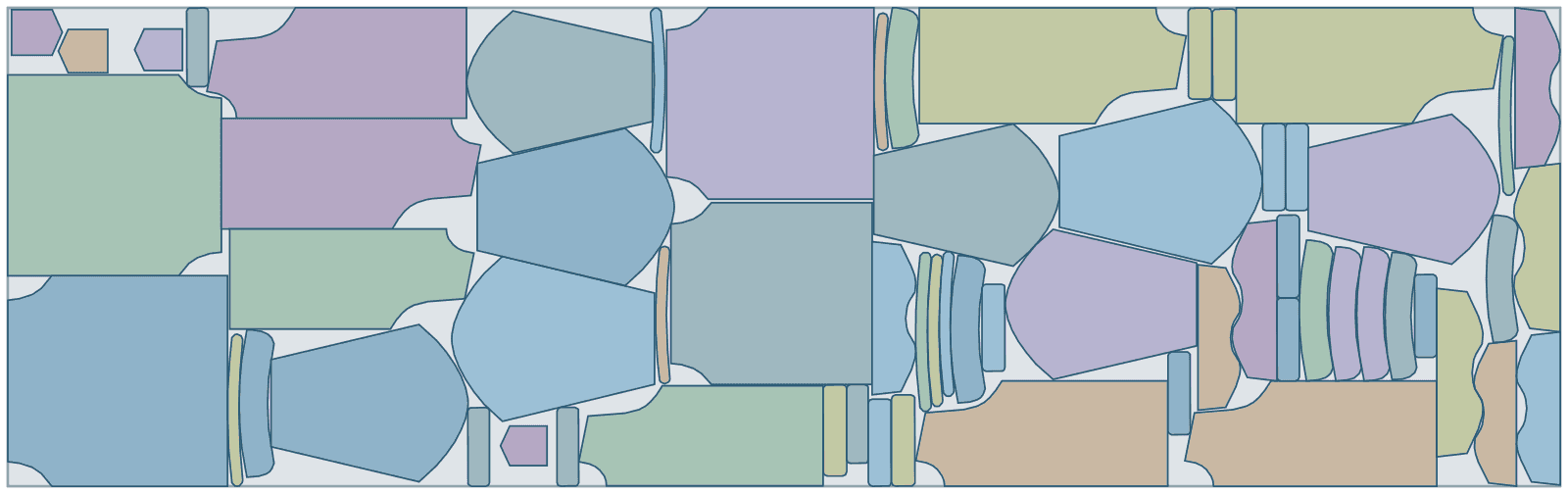
A shirt marker in sizes, 4.87 m long at 89% fabric use
64 pieces of a shirt in a size run, AAMA DXF straight from pattern CAD, on a 1500 mm roll. Each piece keeps its grain line along the roll, turned half round at most, and is never flipped. Its first marker was 5.63 m; the search kept going and cut it to 4.87 m.
| Part | Per set | Rotation | Tilt | Mirror |
|---|---|---|---|---|
| back-xl | 1 | -90°/90° | – | no |
| back-l | 1 | -90°/90° | – | no |
| back-m | 1 | -90°/90° | – | no |
| back-s | 1 | -90°/90° | – | no |
| front-xl | 2 | -90°/90° | – | no |
| front-l | 2 | -90°/90° | – | no |
| sleeve-xl | 2 | -90°/90° | – | no |
| front-m | 2 | -90°/90° | – | no |
| sleeve-l | 2 | -90°/90° | – | no |
| front-s | 2 | -90°/90° | – | no |
| sleeve-m | 2 | -90°/90° | – | no |
| sleeve-s | 2 | -90°/90° | – | no |
| yoke-xl | 2 | -90°/90° | – | no |
| yoke-l | 2 | -90°/90° | – | no |
| yoke-m | 2 | -90°/90° | – | no |
| yoke-s | 2 | -90°/90° | – | no |
| collar-xl | 2 | -90°/90° | – | no |
| collar-l | 2 | -90°/90° | – | no |
| collar-m | 2 | -90°/90° | – | no |
| collar-s | 2 | -90°/90° | – | no |
| cuff-xl | 4 | -90°/90° | – | no |
| pocket-xl | 1 | -90°/90° | – | no |
| cuff-l | 4 | -90°/90° | – | no |
| pocket-l | 1 | -90°/90° | – | no |
| cuff-m | 4 | -90°/90° | – | no |
| collar-stand-xl | 2 | -90°/90° | – | no |
| pocket-m | 1 | -90°/90° | – | no |
| cuff-s | 4 | -90°/90° | – | no |
| collar-stand-l | 2 | -90°/90° | – | no |
| pocket-s | 1 | -90°/90° | – | no |
| collar-stand-m | 2 | -90°/90° | – | no |
| collar-stand-s | 2 | -90°/90° | – | no |
- parts placed
- 64
- material used
- 89.1%
- marker length
- 4.87 m
- gap between parts
- 0 mm
- search time
- 2 min
Want to see how Lescut nests your own parts? Start a free trial or send us your parts.
The problem
The marker decides most of a garment's fabric cost
Savings multiply by plies
A marker is cut through dozens of plies. One centimetre on a marker of a 60-ply lay is 60 centimetres of fabric, on every lay of the order.
Grain, nap and prints
Pieces must stay on grain; napped fabrics and one-way prints cannot turn half round; stripes and checks must meet at the seams. Each rule takes freedom from the layout.
Many markers, little time
Every style, ratio, width and fabric is a new marker. Marker makers either spend the time per marker or accept the first automatic result.
Applications
Where apparel marker making software is used
Shirts and blouses
Woven pieces on grain with stripes and checks matched.
Denim and trousers
Long legs and small pockets in one marker per size ratio.
Knitwear and activewear
Tubular and folded fabric, with pieces on the fold.
Workwear and uniforms
Repeat markers for long runs, where every centimetre is cut again and again.
PPE and protective clothing
Technical fabrics with direction rules and labelled pieces.
Outerwear and down jackets
Shells, linings and baffles from several fabrics, one marker per fabric.
Lingerie and swimwear
Small pieces in stretch fabric, nested by the hundred.
Settings to start from
A starting point for apparel
Rules per part come from text in your file (NAME, QTY, GRADE, ROT, TILT, FLIP) or the parts table; the rest is saved once in a nesting profile that starts every job.
| For | Setting | Why |
|---|---|---|
| Grain | from the AAMA grain line | pieces stay on grain; half turns only when the fabric has no nap |
| Napped or one-way fabric | ROT:0 per piece | every piece faces the same way |
| Stripes and plaids | repeat and tolerance per job | pieces with a match point land on the repeat lines |
| Folded or tubular | fabric fold per job | the marker nests on half the width; pieces with a mirror line go on the fold |
| Gap | 0–1 mm, as your cutter needs | multi-ply knives cut neighbouring pieces cleanly with little or no gap |
| Time | 1–2 minutes for daily markers, 10+ for bulk orders | longer searches pay off on long lays |
Preparing your files
From your CAD to Lescut
Lescut reads AAMA/ASTM DXF as exported by Gerber AccuMark, Lectra Modaris, Optitex, Tukatech, CLO and most other pattern systems, and plain DXF or SVG.
- Export the sizes the marker should hold; each size of a piece becomes its own part, read-only in the parts table and named in labels and the report.
- Keep match points in the pattern for striped or checked fabric; a part's own tolerance wins over the job's.
- Mirror lines in the AAMA file mark pieces cut on the fold.
Good to know
What Lescut does not do
- Lescut does not grade patterns or read rule tables (.RUL): export the graded sizes from your CAD.
- It does not plan cut orders, ply heights or spreading: it makes each marker you ask for.
- Large motifs that must be centred on a piece are not placed: matching lines pieces up on stripe and plaid repeat lines.
Savings
What better nesting is worth in apparel
The same parts need the same area of material however they are nested, so a better yield means buying less of it. Fabric is most of a garment's cost, and every saving on a marker is repeated on every ply. The starting figures are an example for a small cutting room; enter your own.
80% today → 82.0% with nesting. This is your assumption; the trial measures it on your own files.
Engine time: how the plan is chosen
Count every lay cut from a marker; most markers need 2 to 5 minutes, and longer jobs keep shortening them. Your monthly volume divided by this gives the jobs a month, and the calculator picks the cheapest plan whose engine minutes and job length cover them.
The yield gain is your assumption; the trial measures it on your own files. More on how the fabric savings calculator works.
Pricing
Apparel marker making software plans, free for 7 days
Every plan starts with a 7-day free trial with engine minutes to nest your own parts against the rolls you would have used. Add a card when you sign up; you are charged only if you keep the plan.
Textile Starter
€29 per month
120 engine minutes, 8 vCPU per job, jobs up to 2 min
- Roll nesting: fixed width, shortest marker
- Rotation, grain and flip rules per part
- Part-in-part nesting
- DXF / SVG in, DXF / SVG out, layers kept
- Stripe and plaid matching, folded and tubular markers
- 1 user
€0 for 7 days. Card required. Cancel any time.
Extra engine minutes are €0.50 each, with up to 30% off. All fabric nesting plans.
Apparel marker making software: questions
Which pattern CAD systems work with Lescut?
Any that exports AAMA/ASTM DXF, which includes Gerber AccuMark, Lectra Modaris, Optitex, Tukatech and CLO, plus plain DXF and SVG. Lescut reads boundaries, cut-outs, grain lines, mirror lines, sizes, quantities, notches and drill holes.
Can Lescut match stripes and plaids?
Yes. Give the repeat, and every piece with a match point lands on a repeat line within the tolerance, so stripes and checks meet across seams. Matched pieces get no tilt.
Does Lescut do cut order planning?
No. Your planning decides which sizes and ratios go into which marker; Lescut makes each marker as short as it can.
How long should a marker search run?
A minute or two gives a good marker for daily work. For bulk orders, where the marker is cut many times, longer runs on Pro and Enterprise keep shortening it.