A real nest
6 base cabinets from 3 boards, 87% of the board used
A 600 mm kitchen base cabinet with an open end: sides with 32 mm system holes, bottom, rails, shelf, door with hinge bores, a shaped end panel and a curved corner shelf. On 2800 × 2070 mm boards with a 10 mm gap for the router bit; every part keeps the decor grain along its length. The order asked for more cabinets than 3 boards hold, so with prefer complete sets Lescut placed 6 whole cabinets and filled the leftover with 9 parts of the next ones.
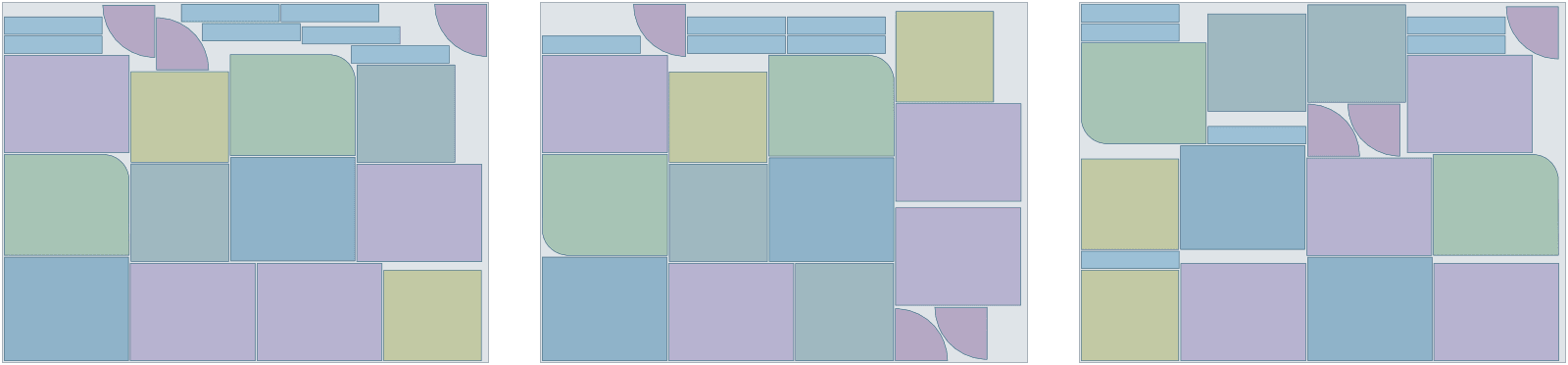
| Part | Per set | Rotation | Tilt | Mirror |
|---|---|---|---|---|
| door | 1 | 180° steps | – | no |
| end-panel | 1 | 180° steps | – | no |
| side | 2 | 180° steps | – | no |
| bottom | 1 | 180° steps | – | no |
| shelf | 1 | 180° steps | – | no |
| corner-shelf | 1 | 180° steps | – | no |
| rail | 2 | 180° steps | – | no |
- complete sets
- 6
- material used
- 87.3%
- sheets used
- 3 of 3
- gap between parts
- 10 mm
- search time
- 2 min
Want to see how Lescut nests your own parts? Start a free trial or send us your parts.
The problem
Decor grain, drilling and shaped parts
Decor grain fixes the direction
Woodgrain melamine and veneer must run the same way on every front and side. A part may turn half round but not 90°, which leaves fewer ways to fill a board.
Drilling belongs to the part
System holes, hinge bores and grooves are machined in the same pass. A nest must carry them with their part and never confuse them with cut-outs.
Shaped parts are not rectangles
Curved shelves, rounded end panels and arched tops waste board when they are boxed into rectangles before nesting.
Applications
Where panel nesting software is used
Kitchen cabinets
Carcasses, doors and shelves with system holes and decor grain kept.
Wardrobes and closets
Tall sides and many shelves nested with their drilling.
Office furniture
Desks and storage in melamine board, nested by order.
Shopfitting and retail displays
Shaped panels and fixtures that are not rectangles.
Joinery and architectural millwork
Curved and shaped parts in veneered board.
Flat-pack furniture
Repeat parts in volume, kits kept whole when stock runs short.
Boat interiors
Bulkheads and bunks in marine ply.
Settings to start from
A starting point for cabinets and furniture
Rules per part come from text in your file (NAME, QTY, GRADE, ROT, TILT, FLIP) or the parts table; the rest is saved once in a nesting profile that starts every job.
| For | Setting | Why |
|---|---|---|
| Sheet sizes and goal | each size with its price; lowest material cost | a job can mix sizes and aim for the lowest cost instead of the fewest sheets |
| Decor and veneer parts | ROT:180, FLIP:N | grain along the length, good face up |
| Carcass parts in plain board | ROT:90 | allow 90° turns where the grain does not show |
| Gap | your bit diameter plus 1–2 mm | the router cuts between parts |
| Sets | 1 set = 1 cabinet | short stock places whole cabinets |
| Drilling and grooves | DRILL, V-GROOVE layers | travel with the part, never cut as outlines |
Preparing your files
From your CAD to Lescut
Cabinet software such as Cabinet Vision, Mozaik, KCD and SketchUp or Fusion 360 with a CNC export writes DXF parts. Lescut reads closed outlines as parts and carries the rest.
- Put drilling on DRILL, grooves on V-GROOVE or SCORE, and labels on TEXT: they travel with their part.
- Leave dimensions and title blocks on layers an import profile ignores.
- Draw edge-banding allowances into the outline if your process cuts oversize.
Good to know
What Lescut does not do
- Lescut nests free-form for CNC routers. It does not make guillotine cutting plans for beam or panel saws.
- It does not write toolpaths, tabs or onion skins: those stay with your CAM.
- Offcuts are not stored as stock yet.
Savings
What better nesting is worth in cabinets and furniture
The same parts need the same area of material however they are nested, so a better yield means buying less of it. Board is bought by the sheet, so a nest pays when it saves whole boards: one board in fifteen is its price saved on every order. The starting figures are an example for a cabinet shop cutting melamine-faced chipboard; enter your own.
80% today → 83.0% with nesting. This is your assumption; the trial measures it on your own files.
Engine time: how the plan is chosen
A day's order of sheets nests well in a job of 1 to 5 minutes; longer jobs can save a further sheet. Your monthly volume divided by this gives the jobs a month, and the calculator picks the cheapest plan whose engine minutes and job length cover them.
The yield gain is your assumption; the trial measures it on your own files. More on how the sheet savings calculator works.
Pricing
Panel nesting software plans, free for 7 days
Every plan starts with a 7-day free trial with engine minutes to nest your own parts against the sheets you would have used. Add a card when you sign up; you are charged only if you keep the plan.
Sheet Starter
€29 per month
120 engine minutes, 8 vCPU per job, jobs up to 2 min
- Sheet nesting: fewest sheets or lowest material cost
- Several sheet sizes in one job
- Rotation, grain and flip rules per part
- Part-in-part nesting
- DXF / SVG in, DXF / SVG out, layers kept
- Complete sets for kits
- 1 user
€0 for 7 days. Card required. Cancel any time.
Extra engine minutes are €0.50 each, with up to 30% off. All sheet nesting plans.
Panel nesting software: questions
Is Lescut panel nesting software?
Yes, for panels cut on a CNC router: it nests the true shapes of your parts on MDF, chipboard or plywood boards and returns one DXF per board. It is not a panel saw optimizer: it does not make guillotine cutting plans for beam or panel saws.
Does Lescut generate CNC toolpaths?
No. It nests the parts and returns one DXF or SVG per board; your router's CAM software adds toolpaths, tabs and cut order.
Can Lescut make cutting lists for a panel saw?
No. Panel saws need guillotine cuts, and Lescut nests true shapes for routers, lasers and knives. It suits shops that cut on a CNC router.
Can I nest on offcuts or two board sizes?
Two board sizes, yes: enter each size with its count. Offcuts not yet, unless you enter them as a rectangular size.
Does the grain stay right on door fronts?
Yes. A part with ROT:180 keeps its grain line along the board, or its drawn direction when it has none, or turns half round, so the grain on doors and sides runs one way; FLIP:N keeps the decor face up.